 Chambaly
How to make an invoice that gets you paid faster
An invoice is the last thing a customer sees from you, and it decides how fast you get paid. A clear invoice with an obvious due date and easy ways to pay tends to get paid sooner. A confusing one ends up at the bottom of a pile.
Most people who work for themselves do not lose money by charging too little. They lose it by billing late, or by sending an invoice that leaves the customer asking "how much, by when, and how do I pay?"
This guide covers what to put on an invoice, how to set payment terms, a sample invoice, and how to make one from your phone.
What to include on an invoice
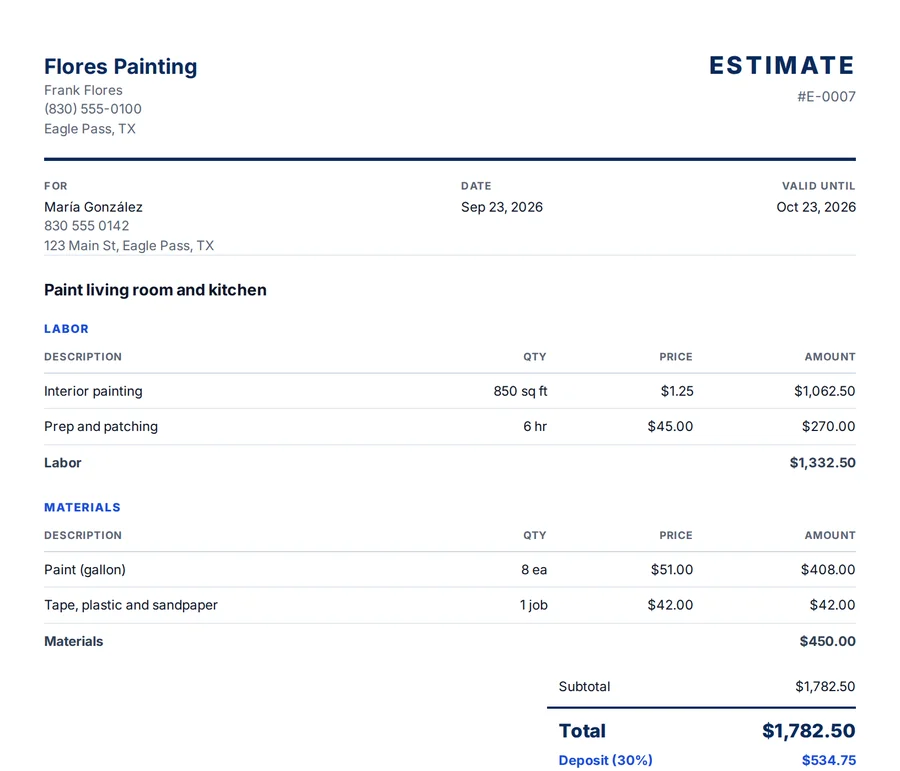
- The word "Invoice" and an invoice number. Numbers let you and the customer track it and avoid mix-ups.
- Invoice date and due date. "Due by Friday, March 10" beats "due soon."
- Your business info. Business name, phone and email.
- Customer info. Name and job address.
- Line items. Labor and materials listed separately, each with quantity, unit and price. People pay faster for what they understand.
- Totals. Subtotal, discount, sales tax if you charge it, deposit already paid, and the balance due.
- Payment options. Zelle, Venmo, Cash App, cash or check, with the exact details. This is the part most people forget.
- Your branding. At least your business name. A logo helps if you have one.
Payment terms, in plain words
Payment terms tell the customer when the money is due. Common ones are due on receipt (pay now), Net 15 (due 15 days after the invoice date) and Net 30 (due in 30 days). For homeowners, a specific date is usually clearer than "Net" terms. Whatever you choose, agree on it in the estimate so the invoice is not a surprise.
Sales tax rules depend on your state and the type of work. If you are not sure whether to charge it, ask a tax professional.
Sample invoice
Here is a water heater replacement invoice. The numbers are made up for this example.
| Section | Item | Qty | Unit | Price |
|---|---|---|---|---|
| Labor | Remove old water heater and install new one | 4 | hour | $65 |
| Materials | 40-gallon gas water heater | 1 | piece | $780 |
| Materials | Connectors, valve and fittings | 1 | job | $60 |
| Other | Haul away old unit | 1 | job | $40 |
Below the lines: subtotal, sales tax if it applies, minus the $300 deposit already paid, and the balance due by the due date, with your payment options right under it.
How to make an invoice, step by step
- Start from the estimate. If you estimated the job in Chambaly and the customer accepted, turn the estimate into an invoice in one tap. Same lines, deposit already figured.
- Or describe the work. No estimate? Say or type what you did: "Water heater swap, 4 hours at 65, 40-gallon heater at 780, they paid 300 down." AI builds the lines. If you leave out a price, it suggests one and marks it for you to check.
- Set the due date and payment options. They print on the PDF so the customer never has to ask.
- Check every number. You sign it, not the AI.
- Send it the day you finish. By text message, WhatsApp or email, in English or Spanish.
Need the estimate first? See how to write an estimate.
Mistakes that delay payment
- Billing days after the job. Send it while the customer is still happy with the work.
- No due date. Without a date, nothing is ever late, and it is awkward to follow up.
- Forgetting the deposit. If you do not subtract it, the customer starts doubting the whole invoice.
- Surprise charges. Put every change on its own line with a clear description, ideally one the customer already approved.
- A dollar amount in a text and nothing else. It looks informal and does not work as a record for either of you.
What happens if they do not pay?
Chambaly reminds you on the due date and gives you friendly, firm and final-notice messages ready to send. Our guide on collecting overdue invoices walks through the whole process. And keep the other side of your books in order too: snap a photo of each receipt when you buy materials so your expenses are ready at tax time.
Questions
What is the difference between an estimate and an invoice?
An estimate is the price you offer before the work. An invoice is the bill you send after the work (or at a milestone) asking to be paid. In Chambaly an accepted estimate becomes an invoice in one tap.
Do I need an invoice number?
It is a good habit. A unique number makes each invoice easy to find, track and refer to when a customer pays or asks a question.
When should I send an invoice?
As soon as the work is done, or at each milestone on bigger jobs. The sooner it goes out, the sooner it tends to get paid.
Can I send an invoice in Spanish?
Yes. Chambaly makes documents in English or Spanish, and AI translates your lines.
Does Chambaly make Mexican invoices (CFDI)?
No. In Mexico a formal "factura" is a CFDI issued through the SAT, and Chambaly does not issue CFDI. Chambaly makes invoices for work in the United States.